Payroll
Payroll contains sensitive personal and financial information. Use only your own authorized account, and never place payroll exports in an unapproved location.
Prepare an employee
- Search Payroll Employees before creating a record.
- Enter employee code, employment type, name, pay frequency, and pay type.
- Enter base salary or hourly details, expected hours, country, region, currency, start date, contract end date when applicable, and Active status.
- Add the approved bank account and recurring allowances or deductions.
- Verify the effective dates and amounts against authorized HR records.
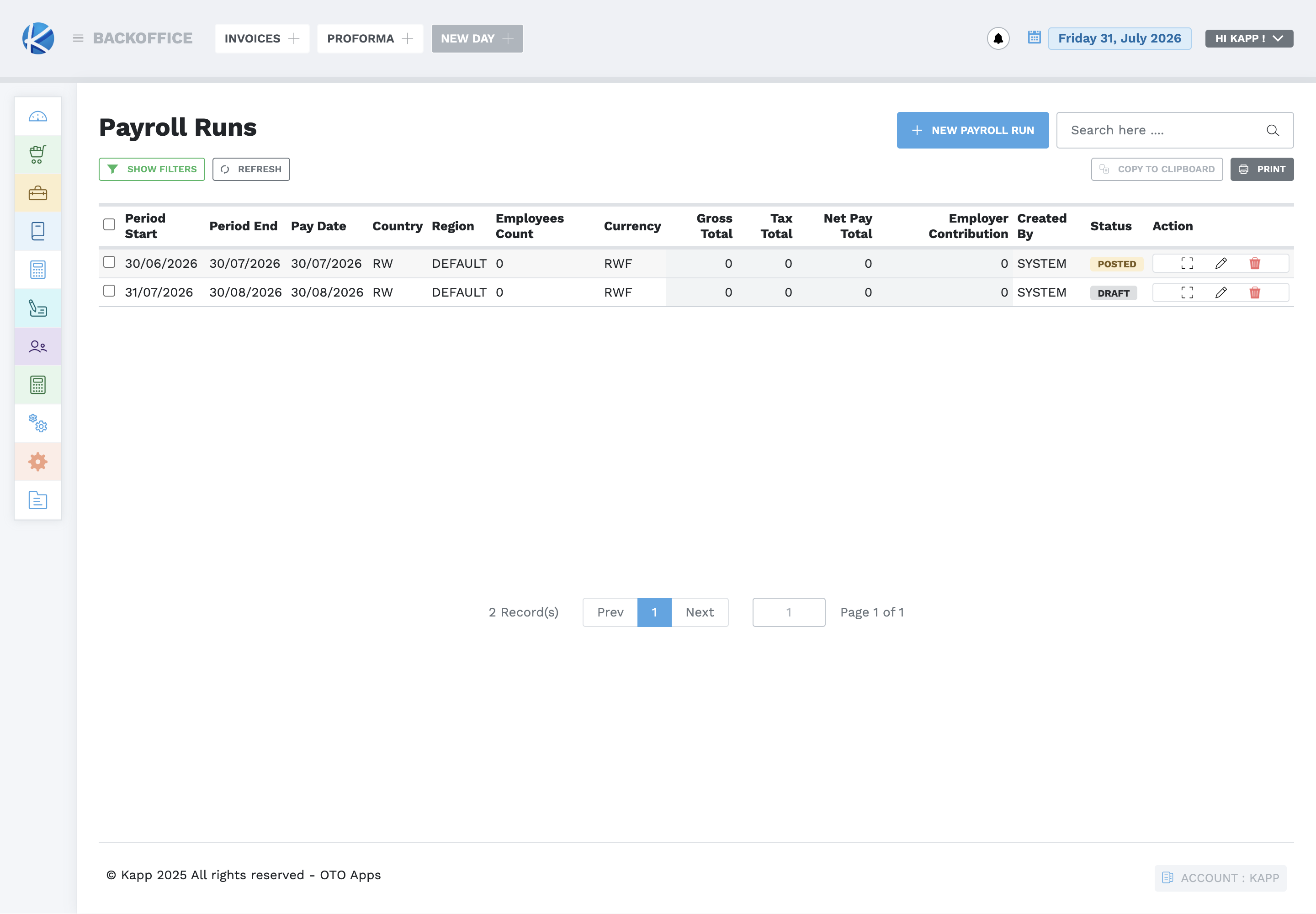
Prepare a payroll run
- Confirm the period start, period end, pay date, country, region, and currency.
- Select New Payroll Run and enter those values.
- Review the employees included in the run.
- Check gross pay, deductions, tax, net pay, and employer contribution.
- Resolve exceptions before approval or posting.
- Post only with the required authority, then verify the status and reports.
Payroll controls
- A Draft run may still be reviewed and corrected.
- A Posted run is completed payroll evidence and must not be casually changed or repeated.
- User Access Management controls who may perform payroll actions.
- Payroll banks, components, and policies must match approved HR and finance rules before a run begins.
- Use Runs Overview and Bank Payment reports to reconcile the completed run.